Cadeo · Slab Automation Suite

From your slab model to construction-ready drawings. Automatically.

Cadeo reads your slab design model and returns the lot — punching shear designed to Eurocode 2 and ACI 318-19, top and bottom reinforcement drafted around the real slab geometry, and a bar bending schedule that survives every revision.

One model in · Calcs + Drawings + BBS out · Windows

Designed to the codes you issue under
Eurocode 2 ACI 318-19 BS 8666 ISO 19650 Metric + US units
The workflow

From slab model to schedules, in five steps.

  1. Export your column reactions from your slab model

    Cadeo reads the reactions, the slab outline and the openings straight from that export. Nothing is re-keyed.

  2. Cadeo does all your punching shear calculations, in minutes

    Every column is checked to Eurocode 2 or ACI 318 and issued as a full calculation you can review.

  3. Cadeo creates your rebar drawings

    Shear details, top reinforcement and bottom reinforcement, all drawn from the same slab geometry.

  4. Make your changes in the Delimiter Editor

    Move, resize, add or delete bars directly on the plan.

  5. Run the re-link to produce your schedules

    The bar bending schedules are rebuilt from the drawing as you left it.

Turn days' worth of drafting and engineering time into a couple of hours.

The film

Watch a slab go from model to issue.

Straight off the screen

Real output. Not mock-ups.

Everything below is captured directly from Cadeo — the live editor, the app, a drafted reinforcement drawing and an issued calc sheet, all from real test jobs.

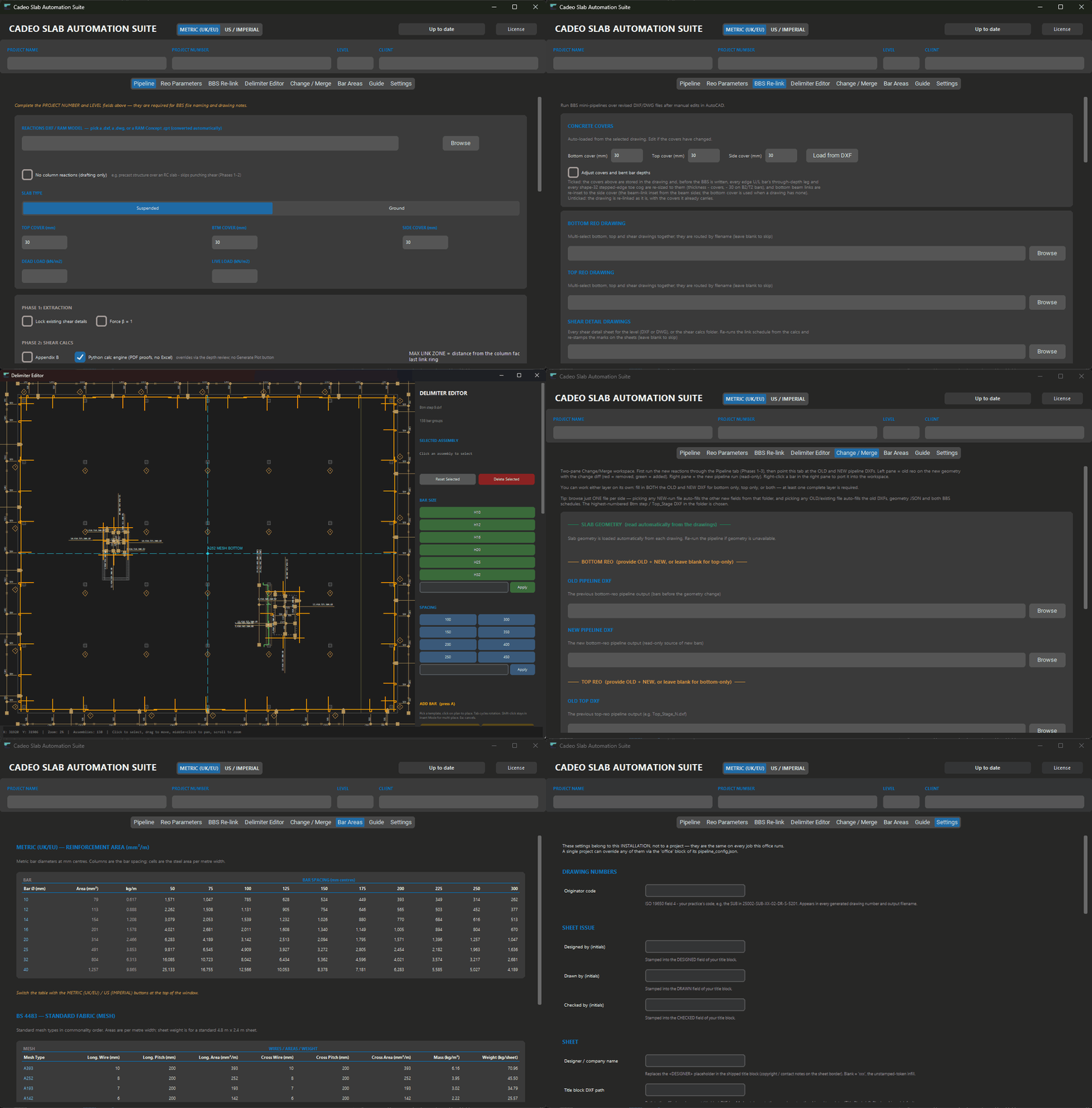
The Delimiter Editor with a full top-reinforcement drawing loaded — 280 bar assemblies parsed and editable
The Delimiter Editor — a drafted top-reo plan open live: 280 assemblies parsed, bar sizes, spacings and the insert template library on the right
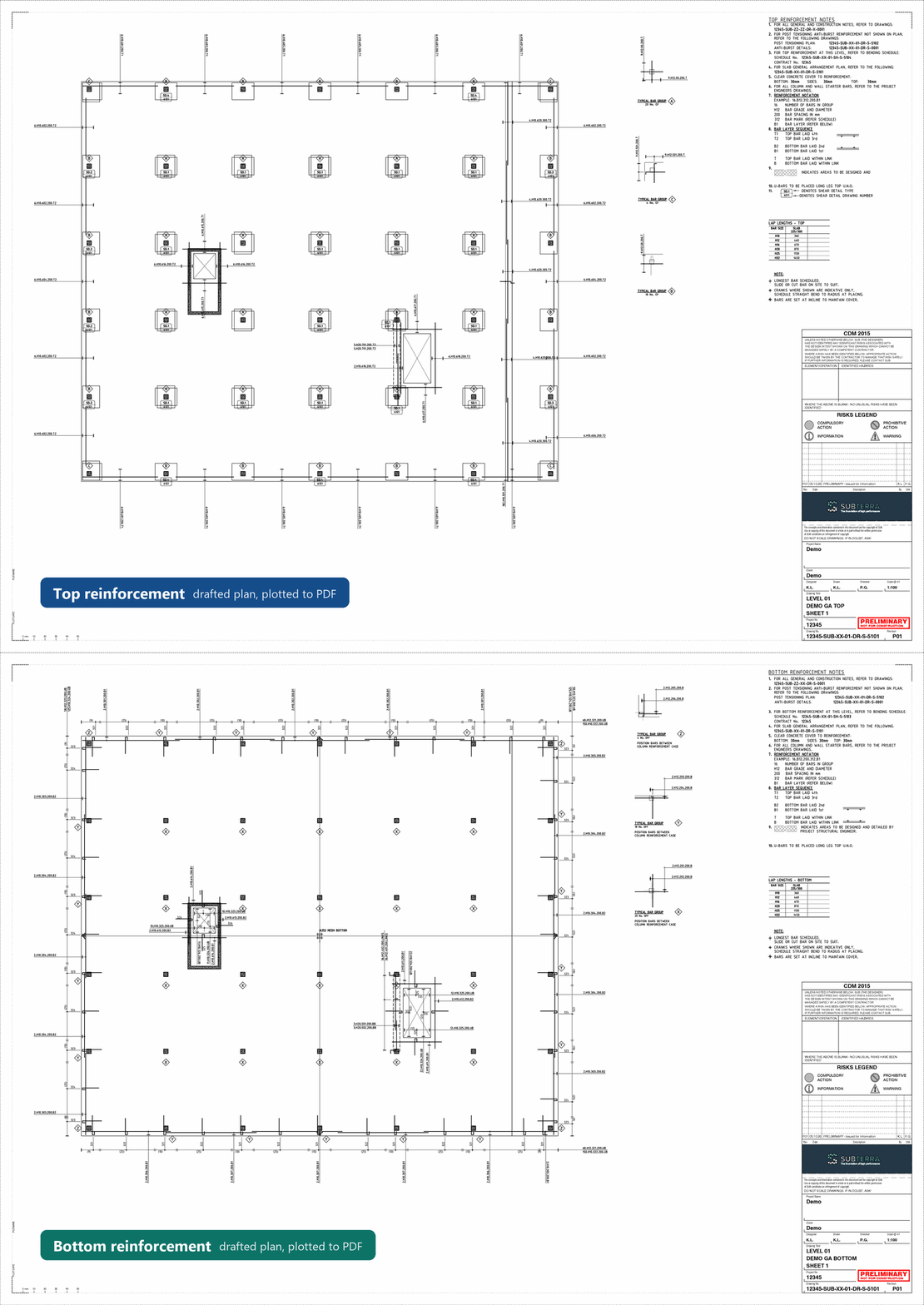
Drafted top and bottom reinforcement plans on a title-block sheet, plotted to PDF, with every bar marked and called out
Drafted reinforcement plans — top and bottom, every bar placed, marked and called out automatically, plotted to PDF
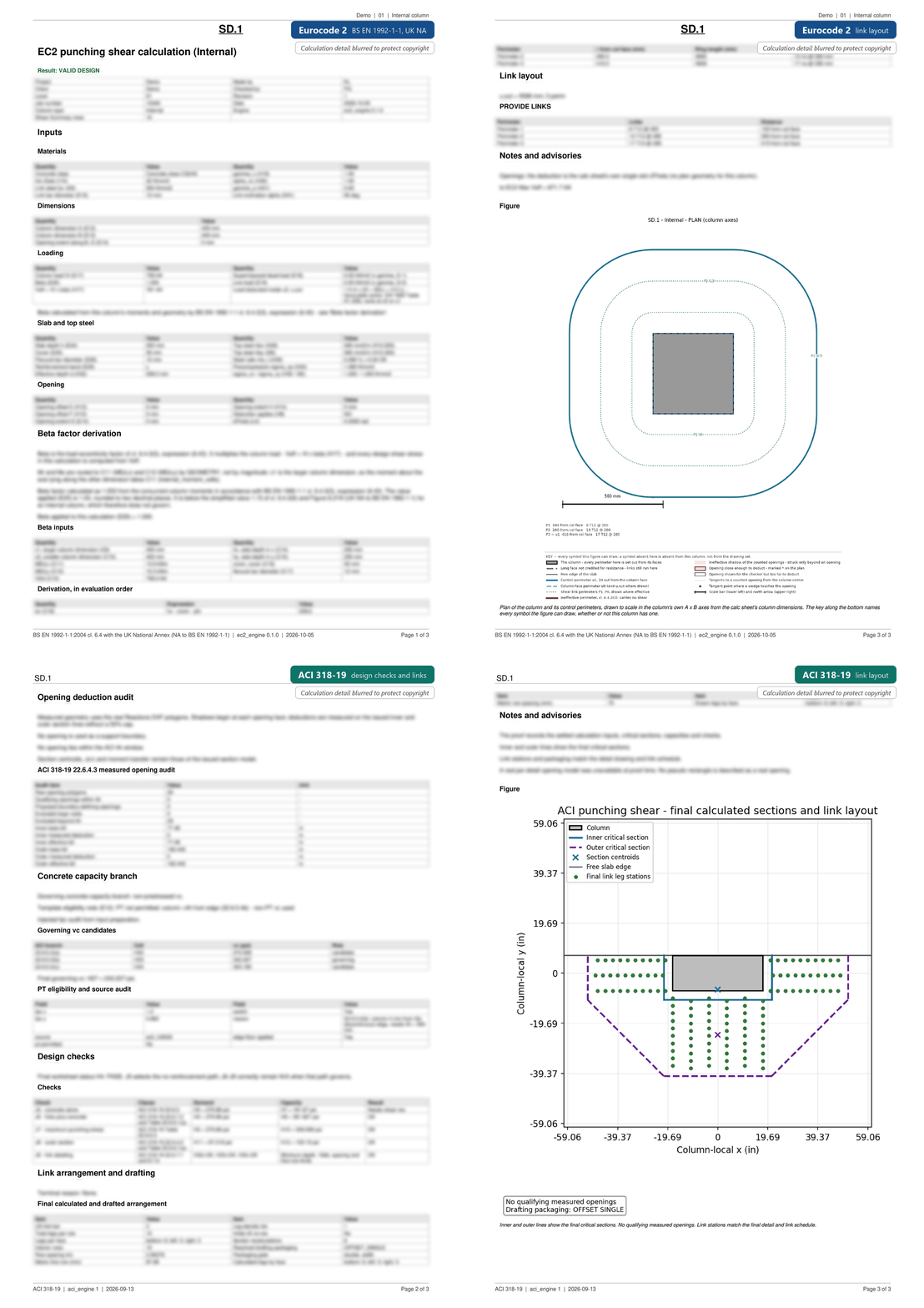
Punching shear calculations cycling through four pages: a Eurocode 2 calculation to BS EN 1992-1-1 and its link layout, then an ACI 318-19 calculation showing the design checks and its link layout
Punching shear calc — Eurocode 2 or ACI 318, every step shown, issued to PDF
The Cadeo app cycling through its tabs: Pipeline, Reo Parameters, BBS Re-link, Delimiter Editor, Change / Merge, Bar Areas, Guide and Settings, with the Delimiter Editor open on a drafted bottom-reo plan and the Change / Merge workspace showing added geometry in green and removed geometry in red
One window — pipeline, reinforcement parameters, BBS re-link, editor, Change / Merge and settings · metric or US / imperial
The product

Built by engineers who had to issue these drawings.

Every rule in Cadeo exists because a real slab needed it. It doesn't draft an idealised plan — it drafts yours.

Calcs

Your punching shear checks, automated

Every column checked to Eurocode 2 or ACI 318, straight from your RAM Concept reactions. Openings, slab edges and corners are picked up from the model, and each check is issued as a full calculation you can review.

Drafting

Drawings that understand the slab

Z bars where the slab steps. L bars stopping short of openings. True chamfered corners, notches, curved edges, trimmers, lacers, construction joints — and lift pits detailed off-plan with a locator tag. Near-identical details consolidate automatically into lettered types.

Schedules

A BBS that survives revisions

BS 8666 shape codes, automatic bar marks, dimensions to 5 mm. Deleted bars keep their row, so printed pages never reshuffle between revisions — and every changed mark carries its revision string. US-format schedules included.

Editor

An editor made for reinforcement

Drag a callout extent and the quantities recalculate. Slide bars, insert new ones from a template library, merge extents, move a whole detail in one gesture. Everything stays linked to the schedule — no orphaned marks.

Production

Into your production drawing

One click transfers the reinforcement into your real, numbered production drawing. Automatic registration finds where the slab sits — asking you to pick only when placement is genuinely ambiguous — and every bar keeps its identity through the move.

Change

Design changed? No churn.

A two-pane Change/Merge workspace compares your issued drawing to a fresh run of the new design. Carry bars across; existing bars keep their marks, new ones get fresh numbers, and revision clouds draw themselves. Hand-edited in AutoCAD? Re-link the BBS without re-drafting.

Cross-checked

Validated against independent commercial reference calculations and the published code text.

30,000+ tests

Over thirty thousand automated regression tests run against every release.

Every bar accounted for

Schedules, edits and transfers stay in sync, even after manual CAD work.

Engineer in the loop

Calculations and PDFs stay editable and reviewable in the tools you already use. Nothing is a black box.

Also in the suite
3D reinforcement viewer Section drawer Beta factors Opening trimmer details Core & wall pull-out bars Step-bar lacers Demo GA sheets One-click updates
Platform

Runs beside the tools you already use.

Cadeo is a Windows desktop application that works with your existing stack — no cloud round-trips, your models and drawings never leave your machine.

  • RAM Concept — the Reactions DXF export is the only input Cadeo needs today. Imports from SAFE, ETABS and Tekla Structural Designer — the other most-used slab design packages — are next on the roadmap.
  • Microsoft Excel — calcs and schedules are real, editable workbooks, not exports.
  • AutoCAD / DWG — drawings issue as DXF and DWG via the free ODA File Converter.
  • Metric or US imperial — native inch-pound ACI templates, US bar sizes and ft-in dimensions, not a converted metric sheet.